Opus 5.5 vs Opus 4.8: Is It Worth Upgrading?

By Emma Reed
MyClaw Editorial
Compare in MyClaw
Compare Claude Opus 5.5 and 4.8 on your own work
Run the same task in both models to compare long-horizon reasoning, production stability, speed, and cost before upgrading.
AI Takeaway
- Which should you choose? Start with Opus 5.5 for a new project, subject to provider support. For an existing Opus 4.8 agent, validate compatibility and results before switching.
- What is the clearest improvement? Opus 5.5's standard API input and output rates are 20% lower, while cache reads cost 60% less.
- How much better is it at coding? Anthropic reports strong gains over Opus 5, but its launch tables do not establish a directly comparable performance margin over Opus 4.8.
- What could delay an upgrade? Changes to thinking settings, tool selection, and conversation handling can require updates to custom integrations.
Opus 5.5 vs Opus 4.8 at a Glance
Opus 5.5 and Opus 4.8 are both Anthropic Claude models. This comparison concerns the two Claude releases; OpenAI's GPT-5.5 is a separate model.
| Detail | Claude Opus 5.5 | Claude Opus 4.8 |
|---|---|---|
| Release date | September 22, 2026 | May 28, 2026 |
| Claude API model ID | claude-opus-5-5 | claude-opus-4-8 |
| Standard input/output per million tokens | $4 / $20 | $5 / $25 |
| Default effort | Medium | High |
| Context window | 1 million tokens | 1 million tokens |
Anthropic recommends Opus 5.5 as the starting point for most workloads. Lower token prices strengthen that recommendation, especially when building a new agent without an existing integration to migrate.
For an established Claude Opus 4.8 workflow, the decision also includes compatibility and the effort needed to validate a replacement. Both models offer substantial context capacity; the upgrade does not give you a larger headline window.
Pricing: Token Rates and the Cost of Finished Work
Compare Standard and Cached Pricing
Anthropic lists these standard API rates in USD per million tokens:
| Token category | Opus 5.5 | Opus 4.8 |
|---|---|---|
| Uncached input | $4 | $5 |
| Output | $20 | $25 |
| Cache reads | $0.20 | $0.50 |
The cache discount matters when an agent repeatedly reuses instructions, documents, or conversation context. Cache writes are billed separately, so actual savings depend on how much reusable input your workflow contains.
Holding token quantities constant, one million uncached input tokens plus 100,000 billed output tokens costs $6 on Opus 5.5 versus $7.50 on Opus 4.8. That illustration excludes tool charges, hosting, and other pricing adjustments.
Anthropic's headline claim of 40% lower workload costs uses Opus 5 as its baseline. It should not be presented as a measured saving against Opus 4.8.
Measure Cost per Accepted Result
Lower rates help, but retries and longer reasoning can change the final bill. Compare the total model and tool charges required to produce an acceptable result. Track elapsed time and human corrections alongside that total.
A patch that needs three repair attempts may cost more than one that takes longer initially but passes its tests immediately. Include those failed attempts when estimating recurring usage.
Budget separately for API usage, Claude subscriptions, and MyClaw hosting. Hosting covers the running workspace; provider token charges are a separate consideration.
Coding, Research, and Agents: What the Evidence Supports
Coding and Multi-Step Tool Use
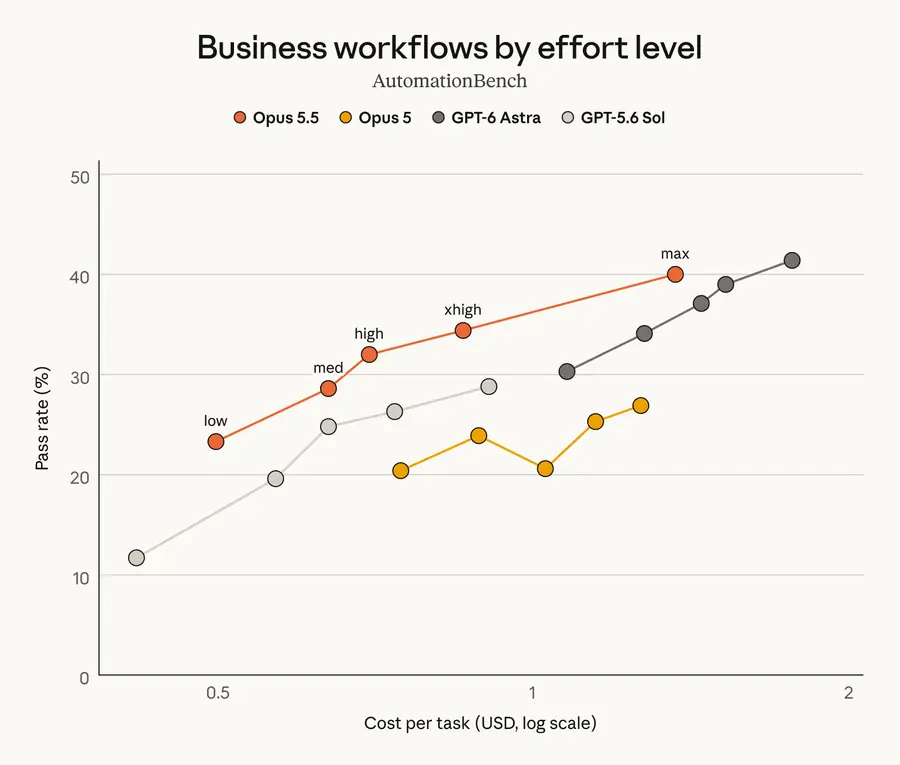
Anthropic reports an early tester auditing and fixing a 200,000-line codebase in under three hours with Opus 5.5, compared with over 20 hours on Opus 5. That is a useful example of its potential on large jobs, but it is an early-access report against a different baseline.
Opus 4.8 already targeted sustained agent work: its launch reports described more consistent tool use, self-checking, and execution across complex tasks. Upgrading is therefore about improving an existing capability, not gaining agent functionality for the first time.
Benchmark labels need equal care. The 5.5 launch table uses Terminal-Bench 4.0; the 4.8 evaluation used Terminal-Bench 2.1. Their scores cannot establish a win or regression against each other.
For coding agent workflows, prioritize completed fixes, passing tests, and preserved behavior. A faster run is valuable only if its changes meet those requirements.
Research and Knowledge Work
In an Anthropic internal research test, Opus 5.5 produced 16 acceptable reports across 18 attempts at different effort settings. The task involved locating quarterly earnings information, and fabricated figures or quotations caused failure. Opus 4.8 was not included in that reported comparison.
This supports testing 5.5 on evidence-heavy work without assuming a known improvement over 4.8. For research agent workflows, check citations, calculations, missing evidence, and unsupported conclusions against the source material.
A 1M-token window gives either model room for large document collections. It does not guarantee that every relevant detail will be used accurately. Project memory also depends on how the application retains files, decisions, and previous results between sessions.

What Changes When You Upgrade from Opus 4.8?
Thinking, Tools, and Progress Updates
For custom API integrations, review four areas:
- Thinking: Opus 5.5 always uses adaptive thinking. Requests that disable it or supply a manual thinking budget are rejected. Tune effort instead.
- Tool selection: Forced
tool_choicemodes are unsupported. Automatic selection with strict schemas can validate tool arguments, but does not guarantee a tool call. - Progress updates: Narration between tool calls arrives in thinking blocks, with its text omitted by default. Applications must request and render those updates to show them.
- Computer use: Replace
computer_20251124on the Claude API and Google Cloud. Amazon Bedrock retains support for the older tool.
Recheck effort settings too. Opus 5.5 defaults to medium, while Opus 4.8 defaults to high. The same setting name should not be assumed to produce the same cost or behavior across models.
Conversation History and Compatibility
Preserved thinking ties reasoning blocks to their conversation context. Where enforcement applies, replaying them after editing earlier messages, tools, or system instructions can trigger errors. Test resumed conversations as well as new ones.
Model switching needs attention: Opus 4.8 cannot read thinking blocks generated by Opus 5.5. A fallback can therefore continue without that earlier reasoning even when the request succeeds.
Anthropic's 4.8 migration guidance combines the 4.8-to-5 and 5-to-5.5 changes. You can upgrade directly; the combined checklist covers changes accumulated between releases.
For a managed interface, confirm model support with the provider. Its integration handles these API details; your check is whether the complete workflow still works as expected.
Should You Switch or Keep Opus 4.8?
Choose according to the work already in front of you:
- Starting a new coding or research agent: Begin with Opus 5.5 if your provider supports it. Anthropic's recommendation and lower rates make it the logical first candidate.
- Running repeated tasks with substantial cached input: Prioritize a 5.5 trial. The lower cache-read rate makes this a particularly relevant cost comparison.
- Maintaining a stable production workflow: Keep 4.8 while resolving compatibility issues or validating the replacement. Migration time belongs in the business case too.
Set a clear acceptance threshold: the new setup must preserve required output quality and meet your cost or completion-time target. Avoid changing the model, prompts, and tools together if you need to identify what caused a difference.
The MyClaw model directory provides an overview of documented options. Confirm account-level access with your configured provider before choosing a deployment model.
Test Your Claude Agent Workflow with MyClaw
1. Start with One Real Task
MyClaw provides managed OpenClaw hosting for private, always-on agent workspaces. Keep the files, tools, and task brief in that workspace so the comparison reflects the job you intend to run regularly.
Pick a bounded task, such as reviewing one pull request. Define success before starting: actionable findings tied to changed lines, no invented issues, and no repository edits.
2. Confirm Access and Compare Fresh Runs
Verify that your configured provider and runtime support the models you want to test, including Opus 5.5. If both are available, use separate fresh sessions with the same starting files, tools, and permissions. Restore any changed files between runs.
Record the effort setting and repeat the comparison across several representative tasks. One unusually good answer should not determine your default.
3. Keep the Setup That Passes
Compare output quality, total usage charges where available, completion time, and corrections. Save the results with the task brief so you can repeat the check after later updates.
Use the configuration that meets your acceptance threshold for recurring work. MyClaw keeps the agent workspace running between sessions, while you retain the review points the task requires.
Compare in MyClaw
Compare Claude Opus 5.5 and 4.8 on your own work
Run the same task in both models to compare long-horizon reasoning, production stability, speed, and cost before upgrading.